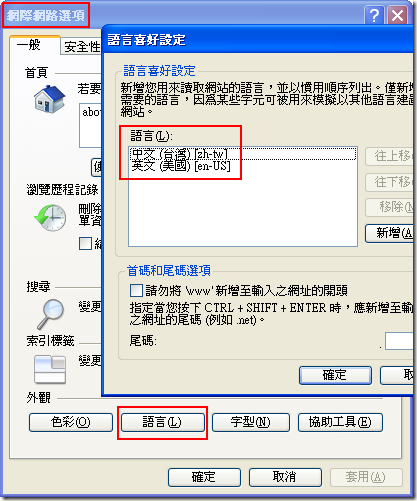
轉錄自:http://blog.miniasp.com/post/2009/06/Auto-language-detection-by-browser-lang-settings-in-ASPNET.aspx 當要利用 ASP.NET 開發多國語系的網站時,我們通常都會利用資源檔 (Resource File; *.resx) 定義網頁中會用到的文字,而且每一種語系就可以定義一組翻譯資料。不過若要讓 ASP.NET 可以讓使用者在第一次進入網站時自動選取該使用者預設的語系進行顯示是再好不過的了,只是 ASP.NET 在預設的情況下這個特性是關閉的。 若要設定整個網站進行自動語系判斷,可以修改 web.config 的設定即可全站套用:<globalization
culture="auto"
uiCulture="auto"
enableClientBasedCulture="true" />
winnercow 發表在 痞客邦 留言(2) 人氣(1,406)
轉錄自:http://www.cnblogs.com/82767136/articles/1254667.html
C# DataGridView 小技巧
1、設置DataGridView的欄位填充整個顯示區
2、調整欄位顯示位置到最後
3、設定控件的欄位自動調整大小
4、設定DataGridView中欄位的寬度
5、得到DataGridView 當前行的位置
winnercow 發表在 痞客邦 留言(0) 人氣(5,237)
轉載自:http://mobile.dotblogs.com.tw/yilinliu/archive/02/12/7136.aspx 有時在處理數字的顯示時,會有一種需求是希望將"第123期"轉為"第一二三期"
,或是將其轉為"第壹貳參期"。
像這種一對一的轉換,有一種寫法如下: string sInput = "045";
string strResult2 = sInput.Replace("0", "0").Replace("1", "一")
.Replace("2", "二").Replace("3", "三")
.Replace("4", "四").Replace("5", "五")
.Replace("6", "六").Replace("7", "七")
.Replace("8", "八").Replace("9", "九");
winnercow 發表在 痞客邦 留言(0) 人氣(2,190)
[轉載] 使用 Regular Expression 驗證密碼
原文链接:http://blog.miniasp.com/post/2008/05/Using-Regular-Expression-to-validate-password.aspx 以前我都沒想過可以用 Regular Expressions 驗證複雜格式的密碼,原來可以用 Regular Expression 中的群組建構式達成這個目的,例如說密碼的條件是這樣:
至少有一個數字
至少有一個小寫英文字母
至少有一個大寫英文字母
字串長度在 6 ~ 30 個字母之間
那麼你的 Regular Expression 可以長這樣:
^(?=.*\d)(?=.*[a-z])(?=.*[A-Z]).{6,30}$
在這段 Regular Expression 的語法中值得注意的就是 (?=.*\d) 這段語法,這段於法又稱做「右合樣 (Positive Lookahead)」,右合樣(或左合樣)語法所佔用的寬度為 0,也就是說這段語法本真不會佔用比對的字元,僅僅只是 Regular Expression 中的一種「判斷式」而已,右合樣 (Positive Lookahead)會判斷右邊緊接著的字元是否符合比對條件,如果符合條件才會繼續比對下去。
所以剛剛這段於法的解釋大致可以這樣說明:
(?=.*\d) 與 (?=.*[a-z]) 與 (?=.*[A-Z]) 寬度都會是零,所以整個字串比對會以 .{6,30} 為主,但比對之前會分別比對 (?=.*\d) 與 (?=.*[a-z]) 與 (?=.*[A-Z]) 這三個判斷式,都判斷成功才會進行 .{6,30} 的比對。所以 (?=.*\d) 的 .*\d 就是說右邊的文字中一定要出現一個數字符號,(?=.*[a-z]) 的 .*[a-z] 就是說右邊的文字中一定要出現一個小寫字母,(?=.*[A-Z]) 的 .*[A-Z] 就是說右邊的文字中一定要出現一個大小字母,最後才會比對 .{6,30} 也就是說比對字串的長度必須在 6 ~ 30 個字的任意字元。
如果你的條件修改成:
至少有一個數字
至少有一個大寫或小寫英文字母
至少有一個特殊符號
字串長度在 6 ~ 30 個字母之間
那麼你的 Regular Expression 可以長這樣(以 C# 作範例):
Regex regex = new Regex(@"^(?=.*\d)(?=.*[a-zA-Z])(?=.*\W).{6,30}$");
winnercow 發表在 痞客邦 留言(0) 人氣(3,305)
ASP.NET 為一種動態網頁語言,必需安裝 .Netframework 元件才能使 IIS Web 具備有執行 ASP.net 程式能力。但因安裝順序錯誤,使得 ASP.NET 沒有註冊因而無法執行,造成用戶端 (Client) 在執行 ASP.NET 程式時,所有點選的程式不會執行,反而被當成一般文件下載。
因此正確安裝方式是必須先安裝 IIS 程式後,才加裝 .Netframework 元件。才不會造成 ASP.Net 沒有在 IIS 註冊,而無法執行的窘境。倘若您不小心安裝順序出現錯誤,也可利用 ASP.Net IIS 註冊工具 -- aspnet_regiis.exe 在 IIS 中註冊 ASP.Net 解決此一問題。
作法:
• 找到 aspnet_regiis.exe 檔案的位置 , 可以對 windows 目錄作搜尋。
• 檔案所在的路徑會因為安裝的版本不同而異,下列路徑僅供參考: C:\WINDOWS\Microsoft.NET\Framework\v1.1.4322\aspnet_regiis.exe
• 進入 dos 提示視窗模式,開始 a 執行 a cmd a 切換目錄到 .netframework 安裝目錄 ( 如作法 2 路徑 ) a 下 aspnet_regiis –i 指令,就會 重新註冊 ASP.Net 於 IIS 。
• 進入 dos 提示視窗模式,下 iisreset 指令重起 IIS 讓新的設定生效。
winnercow 發表在 痞客邦 留言(1) 人氣(551)
每次都查太麻煩,太常用到了,轉過來好了。
HKEY_LOCAL_MACHINE\System\CurrentControlSet\Control\Terminal Server\Wds\Repwd\Tds\Tcp中的PortNumber
HKEY_LOCAL_MACHINE\System\CurrentControlSet\Control\Terminal Server\WinStations\RDP-Tcp中的PortNumber
winnercow 發表在 痞客邦 留言(0) 人氣(218)
winnercow 發表在 痞客邦 留言(0) 人氣(21,299)
using System.Diagnostics;
foreach(Process p in Process.GetProcessesByName("WINRAR"))
{
p.kill();
}
winnercow 發表在 痞客邦 留言(0) 人氣(2,139)
001 using ...System;
002 using System.Data;
003 using System.Configuration;
004 using System.Collections;
005 using System.Web;
006 using System.Web.Security;
007 using System.Web.UI;
008 using System.Web.UI.WebControls;
009 using System.Web.UI.WebControls.WebParts;
010 using System.Web.UI.HtmlControls;
011
012 public partial class excel : System.Web.UI.Page
013 ...{
014 protected void Page_Load(
object sender, EventArgs e)
015 ...{
016 
017
}018 protected void ExportExcel_Click(
object sender, EventArgs e)
019 ...{
020
//匯出excel檔
021
Response.Clear();
022
Response.AddHeader("content-disposition", "attachment;filename=test.xls");//excel檔名
023
Response.ContentType = "application/vnd.ms-excel";
024
Response.Charset = "";
025
System.IO.StringWriter sw = new System.IO.StringWriter();
026
System.Web.UI.HtmlTextWriter htw = new System.Web.UI.HtmlTextWriter(sw);
027
DataGrid dg = new DataGrid();
028
dg.DataSource = this.SqlDataSource1.Select(DataSourceSelectArguments.Empty);
029
dg.DataBind();
030
dg.RenderControl(htw);
031
Response.Write(sw.ToString());
032
Response.End();
033 
034 //儲存excel檔
035
//System.IO.StringWriter sw = new System.IO.StringWriter();
036
//System.Web.UI.HtmlTextWriter htw = new System.Web.UI.HtmlTextWriter(sw);
037
//DataGrid dg = new DataGrid();
038
//dg.DataSource = this.SqlDataSource1.Select(DataSourceSelectArguments.Empty);
039
//dg.DataBind();
040
//dg.RenderControl(htw);
041
//System.IO.File.WriteAllText(@"c:\test.xls", sw.ToString());
042
}043 protected void ExportWord_Click(
object sender, EventArgs e)
044 ...{
045
//匯出word檔
046
Response.Clear();
047
Response.AddHeader("content-disposition", "attachment;filename=test.doc");//word檔名
048
Response.ContentType = "application/vnd.ms-word";
049
Response.Charset = "";
050
System.IO.StringWriter sw = new System.IO.StringWriter();
051
System.Web.UI.HtmlTextWriter htw = new System.Web.UI.HtmlTextWriter(sw);
052
DataGrid dg = new DataGrid();
053
dg.DataSource = this.SqlDataSource1.Select(DataSourceSelectArguments.Empty);
054
dg.DataBind();
055
dg.RenderControl(htw);
056
Response.Write(sw.ToString());
057
Response.End();
058 
059 //儲存word檔
060
//System.IO.StringWriter sw = new System.IO.StringWriter();
061
//System.Web.UI.HtmlTextWriter htw = new System.Web.UI.HtmlTextWriter(sw);
062
//DataGrid dg = new DataGrid();
063
//dg.DataSource = this.SqlDataSource1.Select(DataSourceSelectArguments.Empty);
064
//dg.DataBind();
065
//dg.RenderControl(htw);
066
//System.IO.File.WriteAllText(@"c:\test.doc", sw.ToString());
067
}068 protected void ExportText_Click(
object sender, EventArgs e)
069 ...{
070
//匯出txt檔
071
Response.Clear();
072
Response.AddHeader("content-disposition", "attachment;filename=test.txt");//txt檔名
073
Response.ContentType = "application/vnd.ms-word";
074
Response.Charset = "";
075
System.Text.StringBuilder sb = new System.Text.StringBuilder();
076
DataTable dt = new DataTable();
077
dt = ((DataView)this.SqlDataSource1.Select(DataSourceSelectArguments.Empty)).ToTable();
078
//欄位名
079
for (int i = 0; i < dt.Columns.Count; i++)
080 
...{
081
sb.Append(dt.Columns[i].ColumnName);
082
sb.Append(",");
083
}
084
sb.Append(Environment.NewLine);
085
//資料
086
for (int i = 0; i < dt.Rows.Count; i++)
087 
...{
088
for (int j = 0; j < dt.Columns.Count; j++)
089 
...{
090
sb.Append(dt.Rows[i][j].ToString());
091
sb.Append(",");
092
}
093
sb.Append(Environment.NewLine);
094
}
095
Response.Write(sb.ToString());
096
Response.End();
097 
098 //儲存txt檔
099
//System.Text.StringBuilder sb = new System.Text.StringBuilder();
100
//DataTable dt = new DataTable();
101
//dt = ((DataView)this.SqlDataSource1.Select(DataSourceSelectArguments.Empty)).ToTable();
102
////欄位名
103
//for (int i = 0; i < dt.Columns.Count; i++)
104 
//...{
105
// sb.Append(dt.Columns[i].ColumnName);
106
// sb.Append(",");
107
//}108 //sb.Append(Environment.NewLine);109 ////資料110 //for (int i = 0; i < dt.Rows.Count; i++)111 //...{112 // for (int j = 0; j < dt.Columns.Count; j++)113 // ...{114 // sb.Append(dt.Rows[i][j].ToString());115 // sb.Append(",");116 // }117 // sb.Append(Environment.NewLine);
118 //}
119 //System.IO.File.WriteAllText(@"c:\test.txt", sb.ToString());
120 }
121 }
winnercow 發表在 痞客邦 留言(0) 人氣(4,577)
word的繁簡轉換雖然比較強大,但是所花的時間實在太久了
用VB的套件會快很多,不介意沒有慣用語轉換的話,可以試試
http://sanchen.blogspot.com/2007/12/microsoftvisualbasicstringsstrconv.html -> 這是較深入的探討
winnercow 發表在 痞客邦 留言(0) 人氣(1,427)